oml-v1.1.1.ova · now shipping

Networks, rebuilt in the browser.

OML boots real Cisco IOS, ASA, Juniper, Linux & Windows machines as a topology you draw, console into and packet-capture — no rack, no client install, no per-node fees.

scroll to open the box
The idea → the canvas

Networking labs were stuck between simulators that lie and racks you can't afford. We rebuilt the lab from the wire up — real images, real packets, real configs — and put it inside a browser tab.

Real

QEMU, Dynamips and IOL boot the same images you'd run on a production rack. No fake CLI, no lookup-table simulators.

Live

HTML5 console, in-browser Wireshark, animated packet flows, live CPU and RAM. The wire is observable end to end.

Yours

Self-hosted. One license, your hardware, your students. No per-pod metering. Air-gapped friendly.

Cisco IOS — IOS-XR — IOS-XE — NX-OS — ASA — Juniper — Arista — Mikrotik — Linux — Windows — pfSense — Palo Alto — FortiGate — Cisco IOS — IOS-XR — IOS-XE — NX-OS — ASA — Juniper — Arista — Mikrotik — Linux — Windows — pfSense — Palo Alto — FortiGate —

One graph.
Twelve instruments.

Every module speaks the same topology graph. Draw a link and capture, simulate, score and audit all react in the same breath.

/topology

The canvas everything snaps to

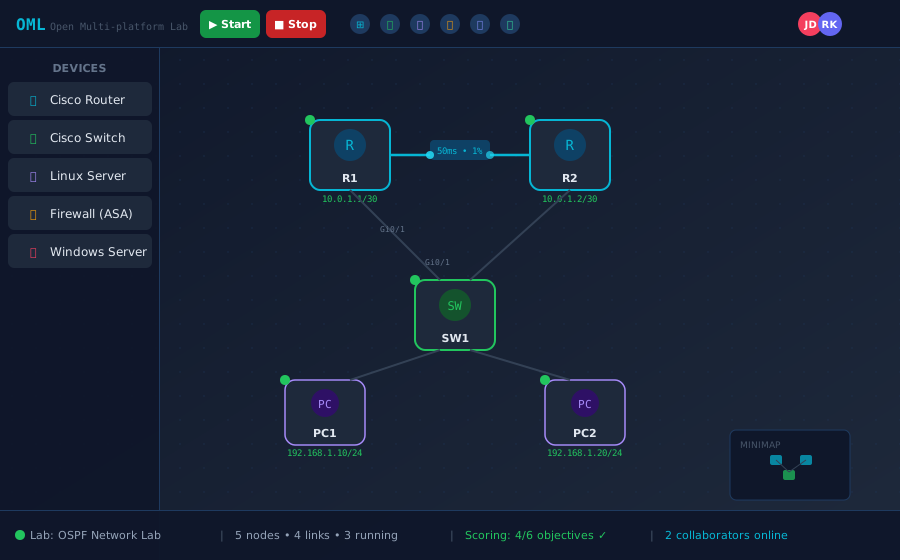
A React-Flow editor with animated WAN badges, real-time multi-cursor collaboration and instant interface auto-IP. Draw it the way you'd whiteboard it — then press boot.

multi-cursor auto-IP WAN badges snap links
/console

Console in the tab

HTML5 terminal, VNC and RDP straight into the running VM. No client install, resilient across reloads.

/capture

Live packet capture

One-click pcap on any link — inspect in-browser or stream into Wireshark over a signed URL.

/simulate

Animated packet sim

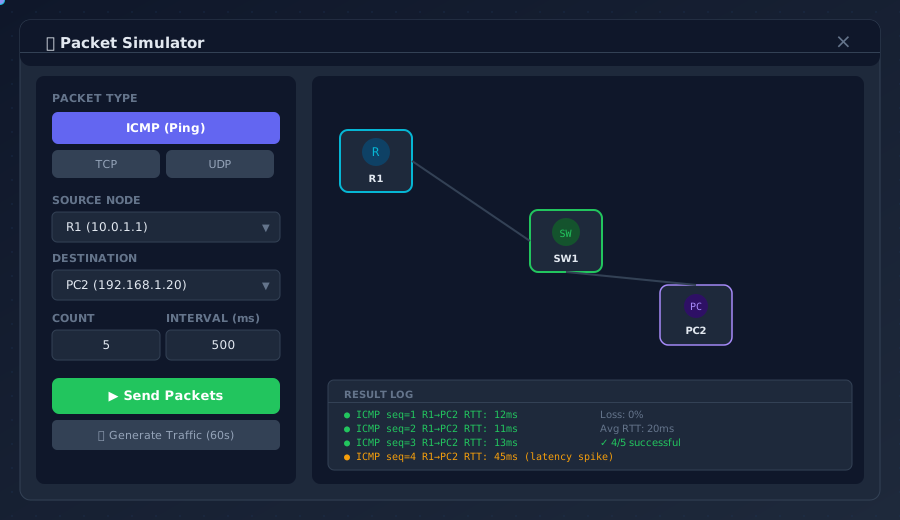
ICMP, TCP, UDP and ARP fly across the canvas with per-hop RTT, success rate and drop reason.

/wan

WAN emulation

Latency, jitter, loss and bandwidth caps per link. Test BGP convergence under hostile conditions.

/score

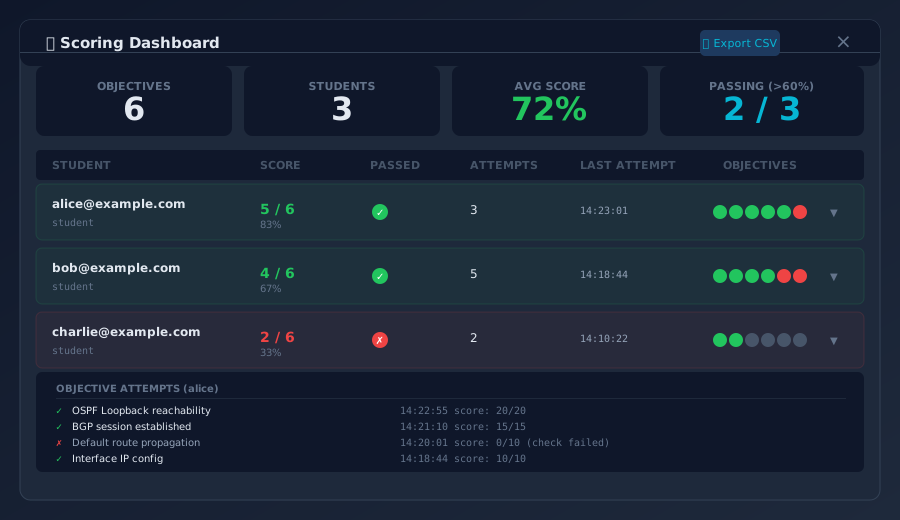
Auto-scoring that grades while they type

Define objectives — OSPF neighbor up, ACL hits, ping success — and OML grades every student lab in real time, then exports straight to your LMS.

/audit

Topology audit

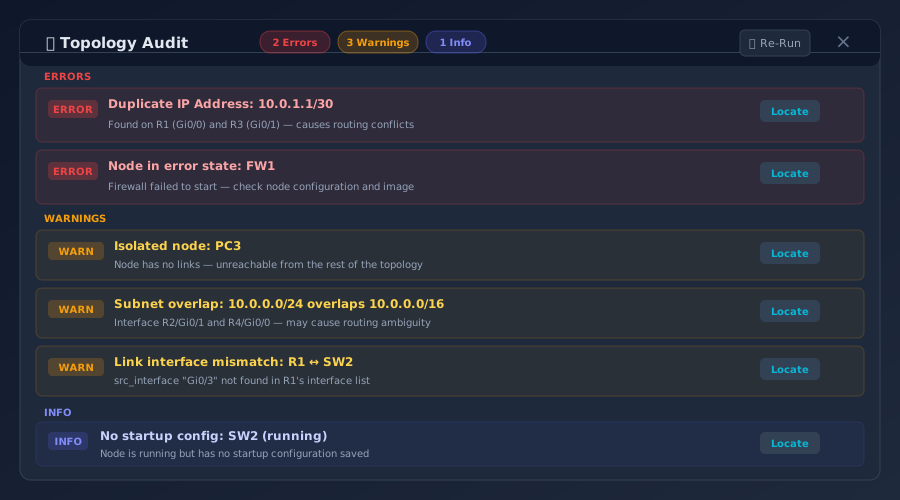
Duplicate IPs, subnet overlaps, isolated nodes, interface mismatches — caught before boot.

/guide

Lab guide

Step-by-step task pane with hints, progress and per-task pass/fail. Instructor-authored.

/study

Cert study packs

CCNA, CCNP and JNCIA flashcards wired into the same session. Spaced repetition built in.

/snapshot

Snapshots

Freeze the whole lab — RAM, NVRAM, link state — and restore in seconds. Branch attempts.

/export

Carry the lab into production

Generate Ansible inventory and playbooks straight from your topology, so the change you rehearsed is the change you ship.

/alerts

Metric alerts

Threshold rules on CPU, memory and interface errors. Firing alerts surface as red cards on the canvas.

The OML canvas · live

One canvas.
Every view of the lab.

Nine views of the same running topology — drawn, booted, captured, scored and explained, all without leaving the tab.

Topology canvas
01 / Topology

Draw it. Boot it.

React Flow canvas with WAN badges, animated link traffic, node libraries by vendor, and live collaboration cursors.

02 / Packet sim

Watch the wire.

Send any L3/L4 probe between any pair of nodes. The packet animates across the topology, with per-hop telemetry on the side.

Packet simulator
Scoring dashboard
03 / Scoring

Grades, automatic.

Instructor-defined objectives turn every student session into a scored attempt. Export CSV, drop into your LMS.

04 / Audit

Caught before boot.

Static analysis runs on every save: duplicate IPs, subnet overlaps, mismatched interface speeds, isolated nodes.

Topology audit
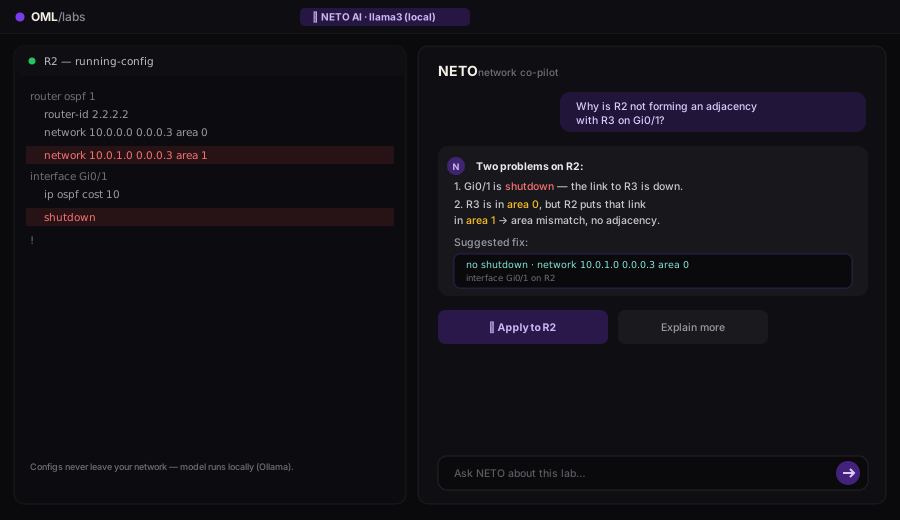
NETO AI assistant explaining an OSPF config
05 / NETO AI

Your AI network co-pilot.

Built-in LLM (Ollama, runs locally — your configs never leave your network) explains stuck protocols, generates starter configs from natural language, and one-clicks fixes onto live nodes. Llama 3, Mistral, or your own model.

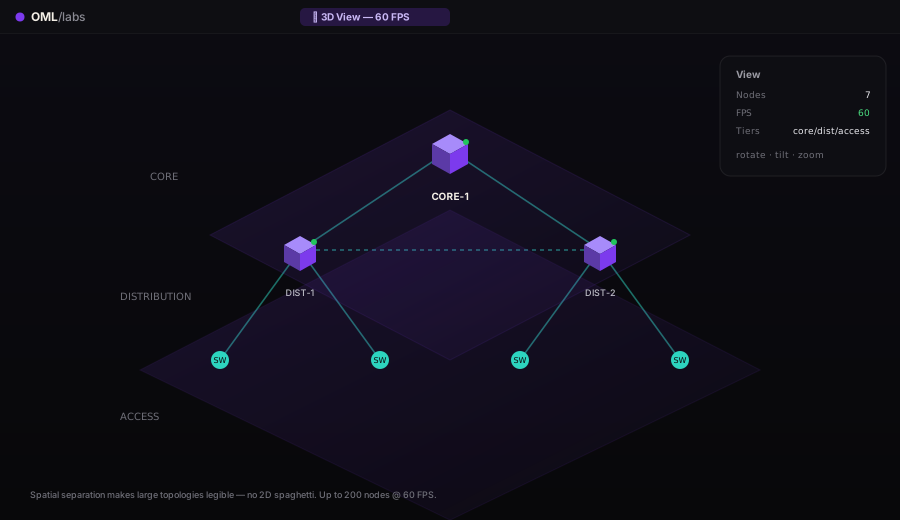
06 / 3D View

Topology in three dimensions.

Rotate, tilt, zoom. Spatial separation between core, distribution and access tiers makes large topologies finally legible — no more 2D spaghetti. Renders 60 FPS up to 200 nodes.

OML 3D isometric topology view
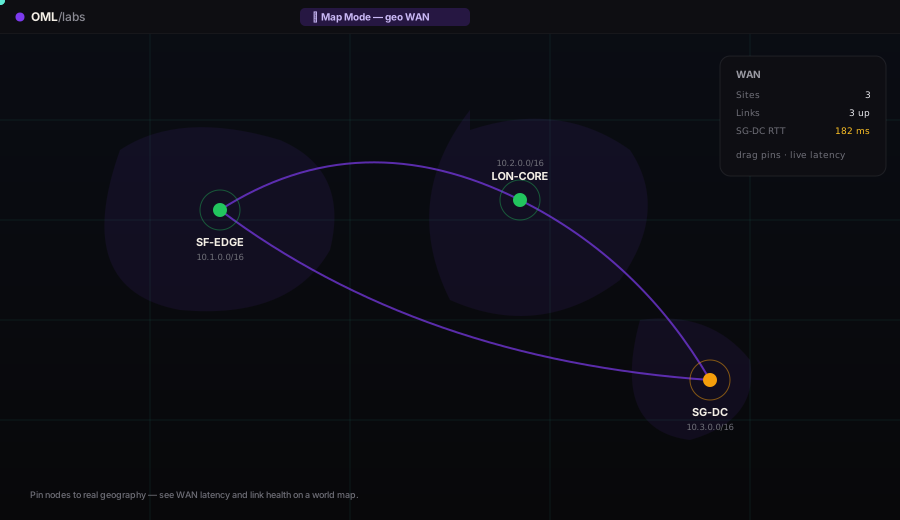
OML map mode showing global SD-WAN sites
07 / Map Mode

Geography, not just diagrams.

SD-WAN, MPLS, multi-region overlays — pin sites to real coordinates, visualize tunnels and BFD state on a world map. The right view for service-provider and global-WAN labs.

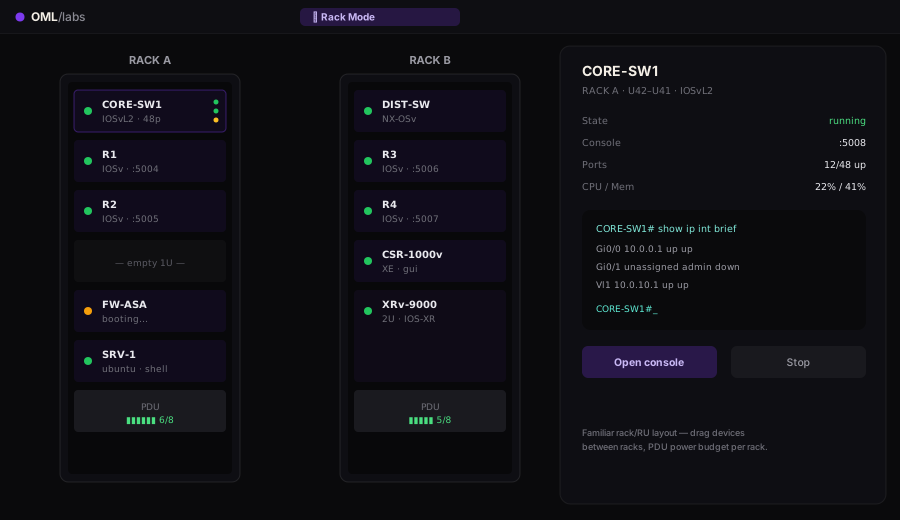
08 / Rack Mode

Build it like a datacenter.

Front-of-rack view with U-counted devices, port LEDs, power draw, and live status. Bind virtual nodes to physical ports for hybrid validation — mix real Cat 9300s into a virtual lab.

OML rack mode showing a datacenter rack with devices
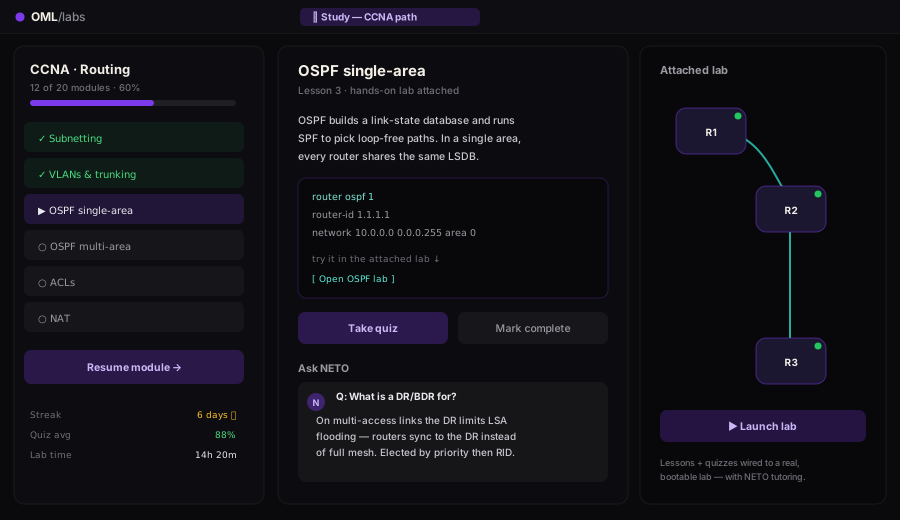
NETO AI tutor walking through an OSPF lab quiz
09 / Study Mode

Cert prep with a tutor that lives in the lab.

CCNA → CCIE study tracks with adaptive quizzes, objective scoring, streaks, and explanations from NETO. Powered by local LLMs (Ollama) — no API keys, no data leaving your machine, no recurring AI bill.

Neto AI

Your network co-pilot, in the lab.

Neto runs on local LLMs (Ollama) — your configs never leave your network. It explains stuck protocols, writes starter configs from plain English, and one-clicks fixes onto live nodes.

Why is OSPF stuck in EXSTART between R1 and R2?
Study Mode

Level up like it's a quest.

CCNA → CCIE tracks with adaptive quizzes, objective scoring, streaks and explanations from Neto — rendered as a system you can feel yourself leveling through. Local LLMs, no API keys, no recurring AI bill.

⚠ SYSTEM ALERT
DAILY QUEST — OSPF Mastery
Form full adjacency on Area 0
Advertise loopbacks into OSPF
Tune DR / BDR election on the LAN
Survive the link-flap chaos round
RANK  B → AEXP  720 / 1000
0
Vendor image families
0
Concurrent nodes per host
0
FPS canvas, even at scale
0%
Self-hosted & air-gappable
Global Community

Booted in browsers around the world.

OML is self-hosted — engineers spin up real Cisco, Juniper, Palo Alto and Linux topologies on their own machines, from study desks to production change windows. No rack, no cloud bill. Drag the globe to explore.

Real multi-vendor images·Free for 5 nodes·Runs in your browser

Own your lab.
One license per host.

No per-student or per-node metering. Free forever for five nodes — pay only when you outgrow it.

Free
$0
No credit card required
— free forever —
Lab capacity
  • Up to 5 simultaneous nodes
  • Single user
  • All vendor images supported
Features
  • In-browser HTML5 console
  • Packet capture (.pcap)
  • VNC / RDP access
  • Lab save / restore
Support
  • Community forum
  • Documentation
MAX
$100 /month
billed monthly
— $1,000 per year if billed annually —
Capacity
  • Unlimited simultaneous nodes
  • Single user · 1 host
Features
  • Everything in Pro
  • Unlimited node capacity
Support
  • Email support
  • 1-year updates included
Enterprise PRO
$200 /month
10 seats · billed monthly
— $2,400 per year if billed annually —
Contact Sales →
Capacity
  • Unlimited simultaneous nodes
  • 10 seats included
  • Real-time collaboration
Features
  • Everything in Pro
  • Ansible export (inventory + playbook)
  • Lab scoring & leaderboard
  • Clone lab to all users (1-click)
  • Config event timeline
  • SSO / LDAP · LMS integration
Support
  • Priority email · 1 BD SLA
  • Named Customer Success Manager
Academy
For training institutes & bootcamps

Per-student node limits · Dedicated seats · Full feature set · Priority support

ACADEMY PRO
$400/mo
20 seats · 50 nodes/user
ACADEMY MAX 50
$1,000/mo
50 seats · unlimited nodes
ACADEMY MAX 100
$2,000/mo
100 seats · unlimited nodes
Custom — Large teams & institutions
Need more than 5 seats?

Multi-host cluster · Unlimited seats · Custom seat blocks · SSO / LDAP · LMS & SCORM · Named CSM · Air-gapped / on-prem deployment

Compare plans

Feature Free Pro Enterprise Custom
Capacity
Simultaneous nodes550UnlimitedUnlimited
User seats115 per blockUnlimited
Hosts111Multi-host
Core features
HTML5 console
Packet capture (.pcap)
VNC / RDP browser access
Lab save / restore
Node snapshots
AI Assistant
Lab export / import (.oml)
Wireshark live stream
Team & collaboration
Real-time collaboration
Clone lab to all users
Lab scoring & leaderboard
Ansible export
SSO / LDAP
LMS / SCORM integration
Support
Community forum & docs
Email support
Priority SLA (1 business day)
Named Customer Success Manager

Frequently asked questions

Each question is a node — tap one to open its answer.

Boot a real router.
In your browser.

From a file to a running console — watch the whole thing happen.

oml-v1.1.1
.ova
Importing appliance…
scroll into view to boot
Book a demo